Azure Active Directory Explained: How It Secures Remote Workforces in 2026
Remote and hybrid work are now permanent parts of modern business operations.
Employees log in from homes, coworking spaces, airports, and mobile devices across multiple locations and time zones. While this flexibility improves productivity and collaboration, it also creates new cybersecurity risks.
That is why identity and access management (IAM) has become one of the biggest cybersecurity priorities in 2026. Organizations no longer rely only on traditional network security. Instead, they focus on protecting user identities, controlling access to applications, and detecting suspicious login behavior in real time.
This shift has increased interest in understanding what is Azure Active Directory and how it supports secure remote work environments.
Developed by Microsoft, Azure Active Directory (now officially called Microsoft Entra ID) helps businesses manage user identities, authentication, and access permissions across cloud and on-premises environments. It acts as a centralized identity platform that allows employees to securely access business applications from anywhere.
In this blog, we will explain what is Azure Active Directory, how it works, its major features, and why it plays an important role in protecting remote workforces in 2026.
What Is Azure Active Directory?
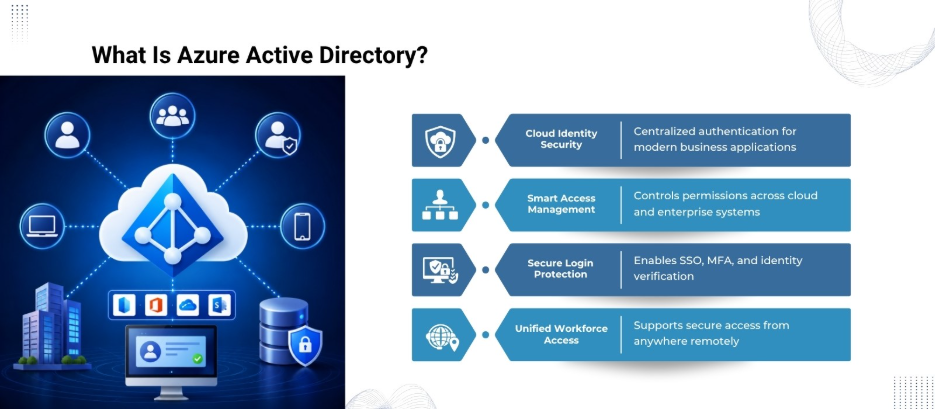
Azure Active Directory (Azure AD) is a cloud-based identity and access management service. It helps organizations authenticate users, manage permissions, and secure access to applications, devices, and corporate resources.
Unlike the traditional Windows Active Directory, Azure AD is designed for cloud-first and hybrid work environments.
It enables businesses to:
- Verify user identities
- Control who can access applications
- Enable secure remote login
- Manage employee permissions
- Protect against identity-based cyberattacks
- Support single sign-on (SSO)
- Enable multi-factor authentication (MFA)
Azure AD integrates with thousands of SaaS applications, including:
- Microsoft 365
- Salesforce
- ServiceNow
- Zoom
- Dropbox
- Google Workspace
- Custom enterprise apps
As businesses adopt more cloud services, Azure AD has become a core part of enterprise cybersecurity strategies.
Why Identity Security Matters in 2026
Cybersecurity threats have evolved significantly over the last few years. Attackers are increasingly targeting user credentials instead of network infrastructure.
However, employees access systems from unmanaged networks and personal devices in remote work environments. This creates multiple security challenges, including:
- Password theft
- Phishing attacks
- Credential stuffing
- Unauthorized device access
- Session hijacking
- Insider threats
- Weak authentication policies
Therefore, traditional perimeter-based security models are no longer enough.
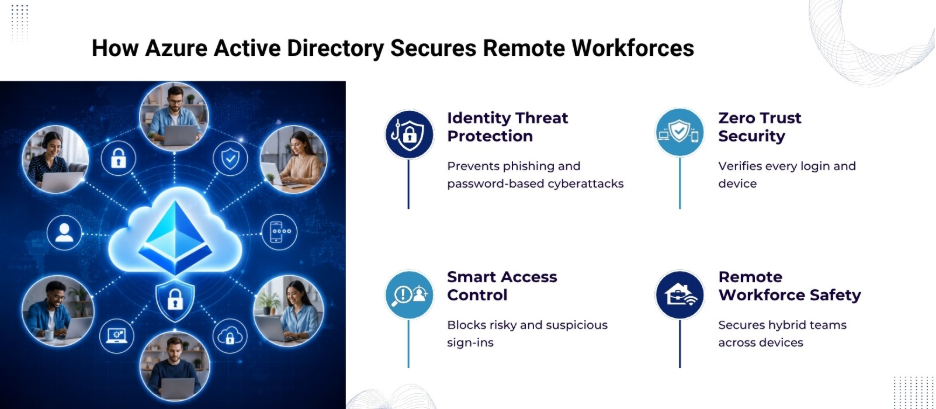
That’s why modern cybersecurity strategies now follow a Zero Trust approach, where no user or device is trusted automatically. Every login attempt must be verified continuously.
Azure Active Directory supports this model by validating identities, analyzing login behavior, and applying security policies dynamically.
How Azure Active Directory Works
Azure AD functions as a centralized identity provider. When users attempt to log into an application, Azure AD authenticates their identity before granting access.
The process typically includes:
- User enters credentials
- Azure AD verifies identity
- Security policies are evaluated
- MFA may be triggered
- Access is approved or denied
- User activity is logged and monitored
This authentication process happens across cloud applications, enterprise systems, and remote devices.
Azure AD also integrates with endpoint management tools and security platforms to create a unified security ecosystem.
Key Features of Azure Active Directory
The growing popularity of Azure AD is driven by its extensive security and access management capabilities.
Core Azure AD Features for Remote Workforce Security
| Feature | Purpose | Benefit for Remote Teams |
| Single Sign-On (SSO) | One login for multiple apps | Simplifies user access |
| Multi-Factor Authentication (MFA) | Additional identity verification | Reduces account compromise |
| Conditional Access | Applies risk-based access rules | Blocks suspicious logins |
| Identity Protection | Detects risky sign-in behavior | Prevents unauthorized access |
| Privileged Identity Management | Controls admin privileges | Reduces insider threats |
| Self-Service Password Reset | Allows users to reset passwords securely | Minimizes IT workload |
| Device Management Integration | Connects with endpoint security tools | Improves device compliance |
| Access Reviews | Regular permission auditing | Prevents excessive access rights |
These features work together to create a layered identity security framework.
Single Sign-On (SSO) Improves Productivity and Security
One of the most widely used Azure AD features is Single Sign-On.
With SSO, employees can use one set of credentials to access multiple applications. Instead of remembering numerous passwords, users authenticate once and gain access to approved systems.
Benefits include:
- Reduced password fatigue
- Lower risk of weak passwords
- Faster login experiences
- Fewer helpdesk password reset requests
- Better user productivity
For remote teams using many cloud applications daily, SSO improves operational efficiency.
Multi-Factor Authentication Adds a Critical Security Layer
Passwords alone are no longer sufficient for protecting accounts.
Multi-Factor Authentication requires users to provide additional verification methods, such as:
- Mobile app approval
- SMS verification code
- Biometric authentication
- Hardware security key
Even if attackers steal passwords, MFA creates another barrier against unauthorized access.
Azure AD supports adaptive MFA, which activates additional verification only when suspicious behavior is detected.
For example, the system may require MFA when:
- A login attempt comes from a new country
- A device is unknown
- The IP address appears risky
- Login behavior differs from normal patterns
This approach balances security and user convenience.
Conditional Access Enables Zero Trust Security
Conditional Access is one of the most powerful security capabilities of Azure AD.
It allows organizations to create intelligent access policies based on:
- User identity
- Device status
- Geographic location
- Application sensitivity
- Risk level
- Login behavior
For example, a company can create policies that:
- Block logins from risky countries
- Require MFA outside office hours
- Restrict access from unmanaged devices
- Prevent access from outdated operating systems
This policy-driven approach strengthens remote workforce security without interrupting legitimate users.
Identity Protection Detects Threats Automatically
Cybercriminals increasingly use automated attacks to compromise user accounts.
Azure AD Identity Protection uses machine learning and threat intelligence to identify suspicious activities like:
- Impossible travel logins
- Anonymous IP usage
- Credential leaks
- Password spray attacks
- Unusual sign-in behavior
When risks are detected, Azure AD can automatically:
- Force password resets
- Require MFA
- Block access
- Notify security teams
Automated threat detection is especially valuable for organizations with distributed remote teams.
Azure AD Supports Hybrid Work Environments
Many organizations still operate hybrid IT environments with both on-premises and cloud systems.
Azure AD integrates with traditional Windows Server Active Directory through Azure AD Connect. This allows businesses to synchronize:
- User accounts
- Passwords
- Security groups
- Access permissions
As a result, employees receive a seamless authentication experience across cloud and legacy systems.
This hybrid support makes Azure AD highly suitable for enterprises undergoing digital transformation.
Device Security Integration Strengthens Endpoint Protection
Remote work security extends beyond user authentication. Devices themselves also need protection.
Azure AD integrates with endpoint management platforms like:
- Microsoft Intune
- Microsoft Defender for Endpoint
- Mobile Device Management (MDM) systems
This integration allows businesses to verify whether devices meet security standards before granting access.
For example, organizations can block access if:
- Antivirus software is disabled
- Operating systems are outdated
- Devices are jailbroken
- Security patches are missing
This reduces the risk of compromised endpoints accessing corporate systems.
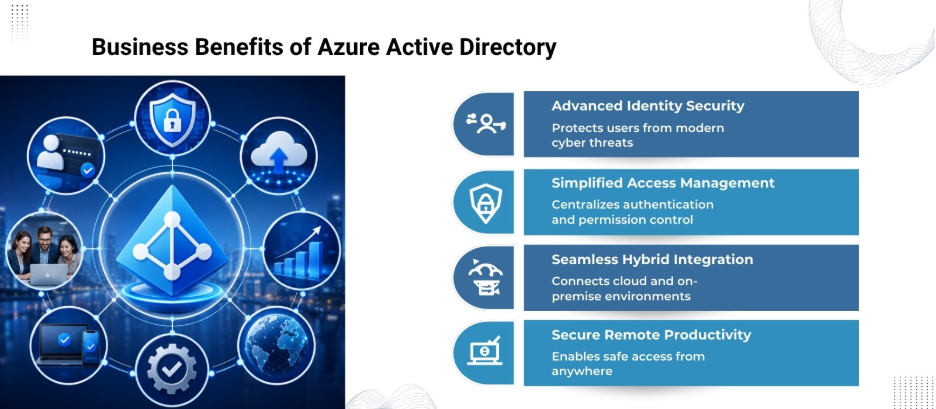
Benefits of Azure Active Directory for Businesses
Improved Cybersecurity
Azure AD protects against identity-based attacks, which remain among the most common cybersecurity threats.
Better Remote Work Support
Employees can securely access applications from virtually anywhere.
Reduced IT Complexity
Centralized identity management simplifies administration.
Scalability
Azure AD supports businesses ranging from startups to global enterprises.
Regulatory Compliance
Built-in auditing and security controls help organizations meet compliance requirements.
Enhanced User Experience
SSO and self-service capabilities improve employee productivity.
Final Thoughts
Understanding what is Azure Active Directory is increasingly important for organizations operating in modern digital environments. As cyber threats continue evolving, identity and access management will remain one of the most critical pillars of enterprise cybersecurity strategy.
Looking to strengthen identity security for your remote workforce? Nurture IT helps businesses implement secure, scalable, and modern IT solutions powered by advanced identity and access management technologies.
Visit our Indiranagar office today to build a smarter and more secure digital workplace.
FAQs
1. What is Azure Active Directory used for?
Microsoft Azure Active Directory is used for identity and access management. It helps organizations authenticate users, secure application access, enable Single Sign-On, and protect remote workforces from cyber threats.
2. Is Azure Active Directory the same as Active Directory?
No. Traditional Active Directory is designed mainly for on-premises environments, while Azure Active Directory is a cloud-based identity and access management platform built for cloud and hybrid workplaces.
3. How does Azure Active Directory improve remote work security?
Azure Active Directory improves security through features like Multi-Factor Authentication (MFA), Conditional Access, Identity Protection, and risk-based authentication policies.
4. What is Single Sign-On in Azure Active Directory?
Single Sign-On (SSO) allows users to access multiple applications with one set of login credentials, which reduces password fatigue and improves productivity.
5. Does Azure Active Directory support Zero Trust security?
Yes. Azure Active Directory supports Zero Trust security by continuously verifying users, devices, and login behavior before granting access to business resources.