Implementing Cisco Networking Solutions with AI-Powered Network Automation
Modern business networks need to do more than just connect devices. They must support cloud applications, remote teams, growing data volumes, cybersecurity controls, and uninterrupted business operations. However, managing all this through manual configuration and troubleshooting can put pressure on IT teams.
This is where AI-powered network automation can make a difference. When implemented thoughtfully, Cisco networking solutions can help IT teams standardize configurations, monitor network health, identify anomalies, and respond to recurring issues more efficiently. For example, Cisco Catalyst Center offers capabilities for device provisioning, configuration templates, software image management, and network assurance.
Implementing Cisco networking solutions isn’t about automating every task; it’s about building a network that is easier to manage, more consistent, and better prepared for changing business requirements.
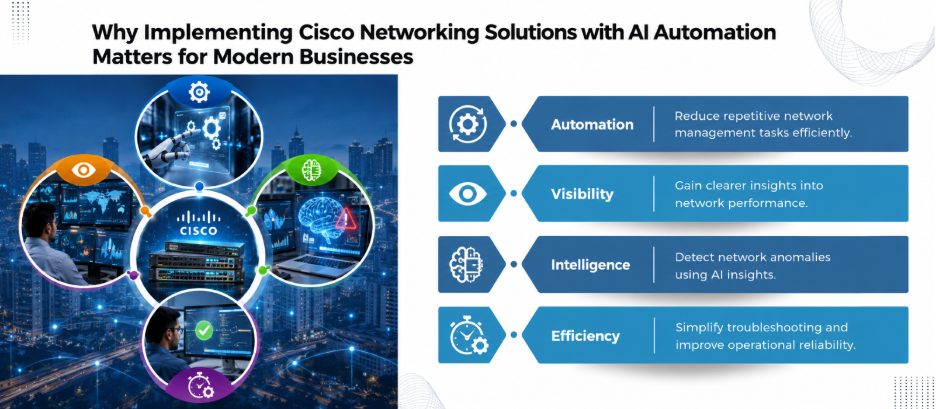
Why Combine Cisco Networking with AI Automation?
Traditional network management often relies on engineers checking dashboards, reviewing logs, entering command-line configurations, and investigating alerts individually. This approach can work for smaller environments, but it becomes harder to maintain as networks expand across offices, branches, campuses, and data centres.
Today, AI-assisted operations can help identify unusual patterns in network telemetry and provide insights into potential issues. Automation can then handle defined tasks, like deploying approved configurations or collecting diagnostic information.
For example, if users at a branch office report poor Wi-Fi performance, network analytics may help an administrator narrow down the problem. Likewise, a separate, validated automation workflow could collect relevant device information or apply an approved configuration change.
However, AI insights do not automatically translate into safe corrective action. The underlying data, device compatibility, automation rules, and approval process all matter.

Five Steps to Implement Cisco Networking Solutions
1. Assess Your Existing Network
Before introducing automation, establish how your network currently operates. Document routers, switches, wireless access points, software versions, VLANs, IP addressing, access controls, and critical application dependencies.
Identify recurring operational problems. These might include inconsistent switch configurations, slow branch deployments, repeated connectivity tickets, or limited visibility into wireless performance.
This assessment helps distinguish tasks that genuinely benefit from automation from those that first require infrastructure upgrades or design changes.
2. Standardize Configurations with Cisco Catalyst Center
Once the network baseline is documented, define approved configuration templates for supported devices. Templates can standardize settings like VLANs, interface parameters, and other network configurations, depending on device capabilities.
Cisco Catalyst Center supports configuration templates, device onboarding, and software image management. Its APIs also allow teams to integrate provisioning and compliance workflows with external automation tools.
A practical example is a company opening a new branch office. Instead of configuring each switch individually, the IT team can use a validated template with site-specific variables. However, engineers should test the template on a limited set of devices before expanding deployment.
For a broader understanding of switches, routers, and access points, check out our business networking infrastructure guide.
3. Use AI-Assisted Monitoring and Troubleshooting
Monitoring becomes more useful when it helps explain why a problem might be happening, rather than simply reporting that a device is unavailable.
Cisco Catalyst Center Assurance can analyze network information and surface issues affecting network and client health. Depending on the platform configuration and licensing, AI Network Analytics can also provide additional insights from network event data.
Consider a wireless network where employees experience intermittent disconnections. Instead of checking every access point manually, an administrator can investigate client-health information, connectivity events, and available telemetry to narrow down the cause.
But before deploying AI-driven workflows, confirm which analytics features your Cisco platform supports. AI insights can guide troubleshooting, but they do not replace validation by a qualified network engineer.
4. Automate Routine Tasks with Guardrails
Automation delivers the greatest value when it addresses repetitive, well-understood tasks. Suitable starting points include:
- Provisioning approved configurations on new devices.
- Checking configuration compliance against defined standards.
- Collecting diagnostic information when an alert occurs.
- Tracking software image versions and planned upgrades.
- Generating reports on recurring network issues.
For changes that could affect production traffic, keep a real person in the loop until the workflow has been thoroughly tested.
This is especially important when implementing Cisco networking solutions across multiple offices. A small configuration error can spread quickly if the same automation is applied indiscriminately to every site.
5. Measure Results and Improve Continuously
Do not measure success by counting automated tasks alone. Track outcomes that matter to employees and the business.
Useful metrics include:
- Mean time to resolve network incidents.
- Number of configuration-related incidents.
- Successful deployment rate for approved changes.
- Network availability and application performance.
- Time required to provision a new branch.
- Number of recurring support tickets.
Record a baseline before deployment, then compare results over time. If automation reduces repetitive work but increases change failures, the workflow needs improvement.
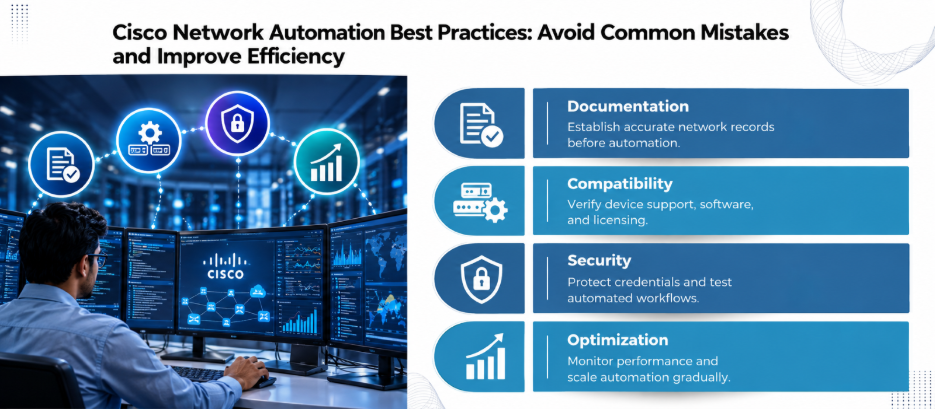
Common Mistakes to Avoid
A few mistakes can undermine an otherwise promising project.
- Automating an undocumented network: Establish an accurate inventory and configuration baseline first.
- Assuming every device supports every feature: Check hardware models, software releases, licensing, and platform compatibility.
- Allowing unrestricted automated changes: Start with monitoring and recommendations, then introduce controlled remediation.
- Ignoring security: Protect API credentials, restrict permissions, and audit automation activity.
- Overlooking staff training: Engineers need to understand the workflows, their limitations, and how to recover when something goes wrong.
Businesses looking for help with the wider infrastructure can explore our IT services.
Final Thoughts
Rolling out Cisco networking with AI automation works best when you start with clear goals, solid network documentation, and thoroughly tested workflows.
The best approach is gradual: establish visibility, automate predictable tasks, introduce AI-assisted insights, and expand only when the results justify it. This gives IT teams more time to focus on network resilience, security, and business growth.
Ready to put a measured plan into action? Get in touch with us!
FAQs
- What is AI-powered network automation?
It combines network automation with AI-based analytics to help identify patterns, investigate issues, and support operational decisions. The exact capabilities depend on the tools and infrastructure in use.
- How does Cisco Catalyst Center support network automation?
It supports capabilities such as device onboarding, configuration templates, software image management, compliance workflows, and network assurance.
- Can AI automatically fix network problems?
Some platforms support automated remediation workflows, but capabilities vary. High-impact changes should be tested and controlled through suitable approval and rollback processes.
- Is Cisco networking automation suitable for small businesses?
Yes, where the available tools and investment are appropriate. Smaller businesses can begin with standardized configurations, centralized monitoring, and repeatable provisioning procedures.
- What tasks should businesses automate first?
Start with repetitive, low-risk tasks, such as configuration checks, device inventory reporting, approved provisioning, and diagnostic data collection.