IT Support Services in Bangalore for Cybersecurity: From Helpdesk to 24/7 Threat Monitoring
A cybersecurity incident rarely announces itself. It might start with an employee clicking a convincing phishing email, an unfamiliar login attempt, or an outdated application running on a laptop. By the time someone notices, sensitive data or business operations may already be at risk.
Therefore, cybersecurity and daily IT operations need to stop living in separate worlds and finally merge into one.
Here is how businesses can build a more secure IT support system, from the helpdesk to round-the-clock threat monitoring.
1. Why Cybersecurity Starts at the Helpdesk
Employees often contact the IT helpdesk before anyone else when something appears unusual. They might report a suspicious email, an unexpected login prompt, or a device behaving differently.
A security-aware helpdesk treats these reports as potential warning signs. For example, repeated account lockouts could indicate forgotten passwords. However, they could also point to attempted unauthorised access. The support team should therefore investigate the context before closing the ticket.
A security-focused helpdesk should include:
- Identity verification before password resets or account recovery
- Multi-factor authentication for supported accounts
- A clear process for reporting phishing emails
- Restricted administrator privileges
- Ticket records for suspicious activity and security incidents
Businesses looking for structured IT support can explore our IT maintenance and support services.
2. Endpoint Security: Protecting Every Connected Device
Every company laptop, desktop, and supported mobile device can become an entry point for attackers. A single compromised endpoint may expose business applications, credentials, or shared files.
Therefore, endpoint security combines several controls. These may include anti-malware tools, endpoint detection and response (EDR), operating system updates, device encryption, and restrictions on software installation.
However, the right configuration depends on the devices and risk profile. For instance, a finance employee handling payment information may require stricter access controls than someone using a device only for general administrative work. Both devices still need appropriate protection.
Therefore, businesses should ask their IT provider:
- Are all company devices included in the asset inventory?
- How quickly are critical security patches deployed?
- Can you remotely manage lost or stolen devices?
- Are endpoint alerts reviewed and investigated?
- Are administrator rights limited to authorised users?
A device management policy is only effective when someone monitors compliance and follows up on exceptions.
3. Network Monitoring Helps Detect Unusual Activity
Network security is important for businesses with multiple offices, remote employees, cloud applications, and shared infrastructure.
A secure network typically uses appropriately configured firewalls, network segmentation, secure remote access, and monitoring tools. These controls help restrict unnecessary access and make suspicious activity easier to investigate.
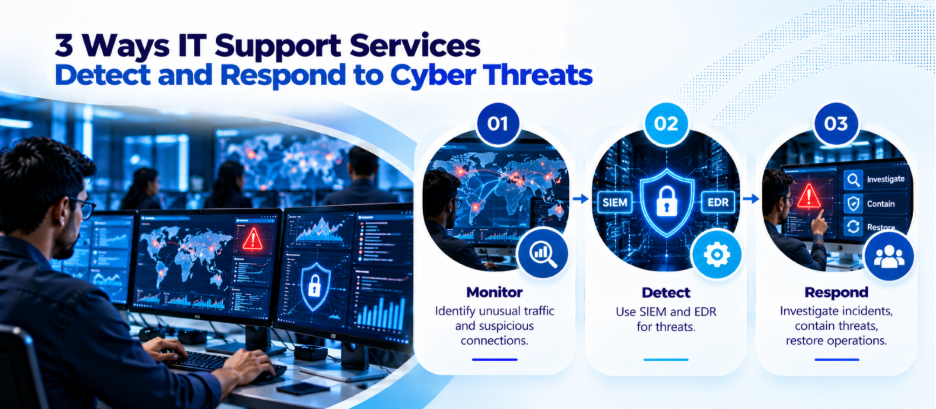
Likewise, network monitoring can help identify unusual connections, unexpected traffic patterns, repeated access attempts, and other indicators of compromise. You may also explore our networking solutions.
4. What 24/7 Threat Monitoring Actually Means
Round-the-clock monitoring means security events can be observed outside normal office hours. However, it doesn’t mean anyone will investigate every alert right away or successfully block every incident.
Businesses should distinguish between automated alert generation, human investigation, and active incident response.
A monitoring service may use a security information and event management (SIEM) platform to collect and correlate logs from supported systems. EDR tools may identify suspicious behaviour on endpoints. Security analysts can then investigate alerts and determine whether action is needed.
Therefore, a mature monitoring arrangement should define:
- Which systems and devices are monitored
- Whether monitoring is continuous or limited to business hours
- Who reviews alerts and how quickly
- Which incidents trigger immediate escalation
- Who can isolate devices or disable accounts
- How incidents are documented and reported
If a provider advertises 24/7 coverage, ask whether qualified personnel are available at all hours or whether the service relies primarily on automated alerts overnight.
5. Incident Response: What Happens When a Threat Is Detected?
Monitoring is only one part of cybersecurity. Businesses also need a documented response process.
Suppose an employee enters company credentials into a fraudulent website. The response may involve disabling active sessions, resetting credentials, checking authentication logs, and reviewing whether the account accessed sensitive information.
A practical incident response process includes five stages:
- Identify: Confirm the alert and assess its severity.
- Contain: Limit further access or damage.
- Investigate: Determine what happened and which systems were affected.
- Recover: Restore systems safely and verify their integrity.
- Review: Document the incident and address the underlying weakness.
Organisations should assess the requirements applicable to their circumstances and establish a clear escalation process.
6. Employee Awareness Is a Critical Security Control
Even well-configured systems can be undermined by unsafe employee behaviour. Phishing, password reuse, unauthorised software, and accidental data sharing are still catching people off guard.
Therefore, employees need clear instructions on recognising suspicious messages, verifying unusual payment requests, handling sensitive files, and reporting possible incidents.
IT teams can reinforce this through simulated phishing exercises, short security briefings, and simple reporting procedures. The goal is not to blame employees for mistakes. It is to make safe behaviour practical and suspicious activity easier to report.
7. How to Choose the Right IT Support Partner in Bangalore
Every organisation should understand its security responsibilities and the level of support it is purchasing.
Before choosing IT support services in Bangalore, evaluate providers against these criteria:
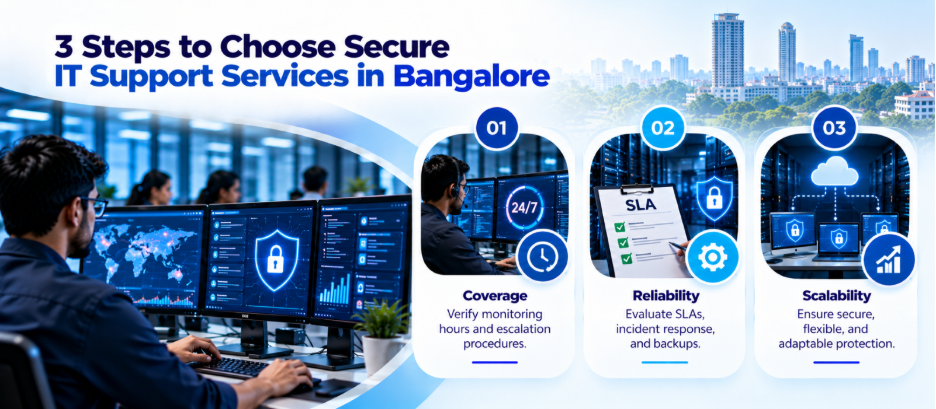
- Defined coverage: Confirm support hours, monitoring coverage, and escalation times.
- Documented responsibilities: Establish who manages endpoints, networks, backups, and security alerts.
- Access controls: Check how privileged accounts and remote support sessions are protected.
- Incident response: Request a documented procedure for suspected breaches.
- Reporting: Ask for regular reports covering unresolved risks, patch status, and incidents.
- Recovery planning: Verify backup arrangements and test restoration procedures.
- Scalability: Confirm that coverage can adapt as your workforce and infrastructure grow.
Also review the service-level agreement (SLA). It should distinguish between response time, resolution time, and security incident escalation. These are different commitments.
Final Thoughts
Cybersecurity works best when it is built into daily IT support rather than treated as an occasional project. For companies evaluating IT support services in Bangalore, the priority should be finding a provider that offers clear responsibilities, appropriate security controls, and transparent reporting.
Connect with us to build an IT support plan that fits your business.
FAQs
1. What are IT support services in Bangalore for cybersecurity?
These services combine everyday technical support with security measures such as endpoint protection, access management, network monitoring, patching, and incident escalation.
2. Why does a business need 24/7 threat monitoring?
Threats can occur outside office hours. Continuous monitoring helps identify suspicious activity when internal IT staff may not be available, provided the service includes appropriate alert handling and escalation.
3. What is endpoint detection and response?
EDR is a security technology that monitors endpoint activity, detects suspicious behaviour, and supports investigation and response. Its capabilities depend on the product and configuration.
4. How often should business computers receive security updates?
Updates should follow a documented patch management policy. Critical vulnerabilities and actively exploited weaknesses may require urgent action, while other updates can follow a risk-based schedule.
5. Is antivirus software enough to protect a business?
Usually not on its own. Businesses may also need multi-factor authentication, firewalls, endpoint monitoring, access controls, secure backups, employee training, and incident response procedures.