What Does Good IT Infrastructure Support Look Like After Business Hours?
Most businesses think about IT infrastructure support during the workday. Tickets are raised, users call the helpdesk, engineers troubleshoot devices, and network issues get escalated.
But the real test often begins after 6 PM.
A failed VPN connection at 9:30 PM. A server alert at midnight. A security notification over the weekend. A critical employee unable to access business applications before an early-morning client meeting.
These situations reveal whether IT support is genuinely operational or simply available during convenient hours. Good IT infrastructure support after business hours is not about having someone answer a phone at night. It is about having the right systems, people, escalation paths, monitoring, and response processes in place when the business is most vulnerable to an unattended problem.
After-hours support is about risk, not just response time.
A common mistake is to define after-hours support using a simple promise: “We provide 24/7 support.”
That statement says very little.
The more useful question is: What happens when something important fails at 11 PM?
A mature support model distinguishes between incidents that can wait until morning and those that could materially affect operations, security, revenue, or customer commitments.
For example:
- A printer failure in an unused department may wait.
- A failed firewall may require immediate attention.
- A locked employee account may need a quick remote resolution.
- A ransomware-related alert should trigger an established security response process.
- A server failure supporting a customer-facing application may require immediate escalation.
That distinction should be built into the support model before an incident occurs.
1. There should be a clear definition of “critical”
After-hours teams should not treat every ticket as an emergency. Instead, businesses should establish severity levels based on business impact.
A useful framework might classify incidents as:
- Critical: A major security incident is suspected, or core business services are unavailable.
- High: A major function is impaired, but a temporary workaround exists.
- Medium: A limited group of users or a non-critical service is affected.
- Low: Routine requests, minor problems, or issues that can wait for normal operating hours.
This classification helps the support team spend its limited overnight resources where they matter most.
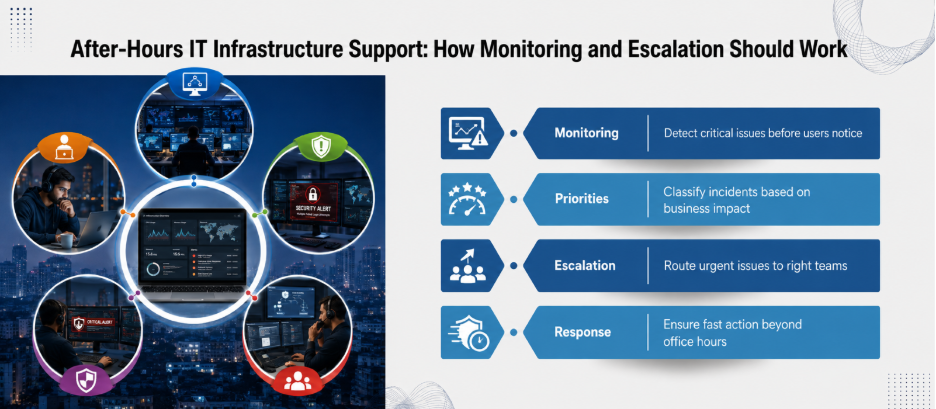
2. Monitoring should detect problems before employees do
The best after-hours support often starts before anyone raises a ticket. Servers, network devices, cloud services, firewalls, backups, endpoints, and other important systems can generate alerts with defined conditions.
Therefore, logging and monitoring are quite valuable for security. CISA recommends logging relevant activity and setting alerts for high-risk events.
But alerts alone are not enough.
A business needs to know:
- Which alerts require human intervention?
- Who receives them?
- What happens if the first person does not respond?
- How quickly should the issue be acknowledged?
- When does it move to another technical team?
- Who communicates with business leadership?
Without those answers, monitoring can simply produce a large pile of notifications.
3. The escalation path should work at 2 AM
An after-hours support model can fail even when skilled engineers are available.
Why?
Because nobody knows who has authority to act.
Suppose a firewall begins blocking legitimate traffic overnight. The engineer identifies the problem but needs approval before changing a production rule. If the approver is unreachable, the technical capability becomes irrelevant.
Therefore, good IT infrastructure support needs an escalation matrix covering technical, managerial, security, vendor, and business contacts. It should also specify backup contacts.
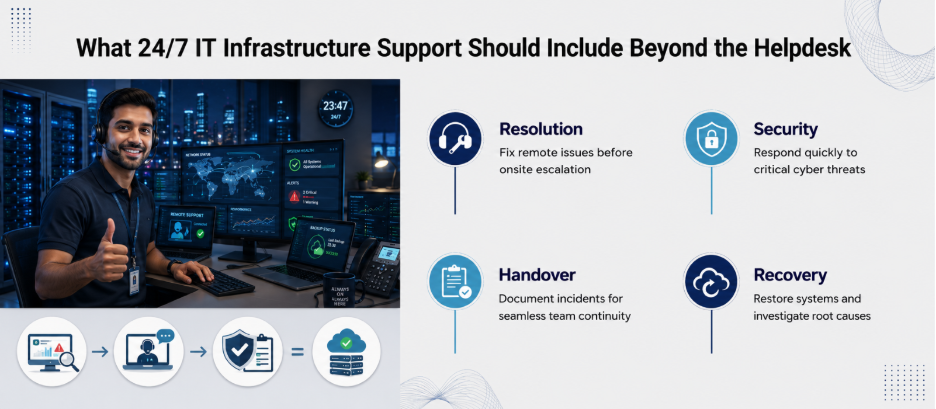
4. Remote resolution should come before unnecessary onsite visits
Many after-hours problems can be resolved remotely. Today, techs can investigate endpoints, restart services, and fix connection issues remotely instead of waiting to get on-site.
The goal is not to eliminate on-site support.
It is to avoid sending an engineer across the city at midnight when a controlled remote fix can solve the problem.
5. The handover from night to day matters
An incident resolved overnight is not necessarily finished. The morning team needs context.
Therefore, a proper handover should record:
- What happened
- When the incident started
- What systems were affected
- What actions were taken
- What changed
- What remains unresolved
- Whether users experienced downtime
- Whether monitoring should continue
- Whether a root-cause investigation is required
This prevents the day team from starting the investigation from scratch.
6. Security cannot have an “office hours” mindset
Cybersecurity is one of the strongest arguments for serious after-hours coverage. Attackers don’t look at your company calendar before they strike. CISA has specifically warned that malicious actors can target weekends and holidays when cybersecurity staffing gaps exist.
Because of this, your after-hours team needs to stay in perfect sync with your broader security practices. That means knowing what happens when there is:
- A suspicious login
- Malware detection
- An unusual privilege change
- A compromised endpoint
- A suspected ransomware event
- Unexpected network activity
The objective is to have a defined response path.
7. Measure the support model, not just the number of tickets
A business should look beyond ticket volume.
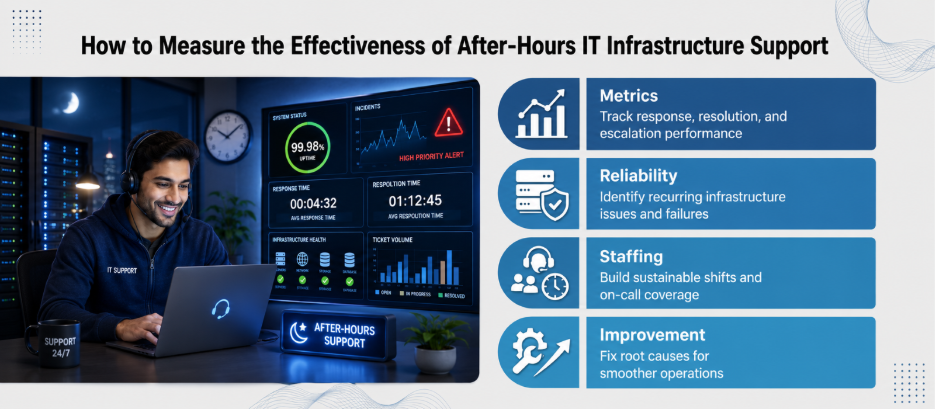
Useful after-hours metrics include:
- Mean time to acknowledge: How quickly was the incident recognized?
- Mean time to resolve: How long did it take to restore service?
- First-contact resolution: How often could the issue be resolved without escalation?
- After-hours incident frequency: Which systems repeatedly fail outside normal hours?
- Repeat incidents: Did the same underlying problem return?
- Escalation performance: Were the right people reached when required?
These measurements can expose weaknesses that a basic uptime report misses. If a particular server generates five emergency incidents every month, the answer may not be “add more overnight support.” The better answer could be replacing aging hardware or fixing the underlying application.
8. Good support also protects the people providing it
There is another side to 24/7 operations: the support team. Round-the-clock availability cannot depend on a single engineer answering every call.
A sustainable model needs defined shifts, on-call rotations, escalation rules, documented procedures, and reasonable workload management.
This is important because burnt-out technicians are not a reliable resilience strategy.
The real test of after-hours support
Good IT infrastructure support after business hours should feel almost invisible to employees.
They may never know that a failed service was detected at 1:15 AM, investigated at 1:20 AM, escalated at 1:30 AM, and restored before the first employee logged in.
That is the point.
Ready for support that works quietly and reliably? Partner with Nurture IT in Indiranagar today!
FAQs
1. What should after-hours IT support cover?
It should cover incidents that could materially affect business operations, security, connectivity, critical applications, servers, networks, and other defined business-critical systems.
2. Does after-hours IT support always mean 24/7 staffing?
No. Businesses can use different models, including on-call engineers, managed services, automated monitoring, or dedicated 24/7 teams. The appropriate model depends on business risk and operating requirements.
3. Which IT issues should be treated as emergencies?
Examples include major network outages, critical server failures, significant security incidents, widespread application outages, and other failures that materially disrupt important business functions.
4. Can monitoring replace an IT support team?
No. Monitoring can detect defined events and generate alerts, but people are generally needed to investigate, make decisions, perform remediation, and coordinate recovery.
5. Why are escalation procedures important after business hours?
They remove uncertainty about who should respond, who has authority to approve changes, and when an incident should move to another technical or business team.