IT Infrastructure Modernization: What Should SMBs Upgrade First?
For small and mid-sized businesses, IT modernization rarely fails because the technology is unavailable. It fails because companies upgrade the wrong things first. Therefore, modernization should be treated as a business-priority exercise, not a shopping exercise.
The right question is not, “What technology should we buy?” It is, “Which infrastructure limitation is currently costing us the most in downtime, security exposure, employee productivity, or growth?”
That shift in thinking can make an IT infrastructure solution provider far more valuable as a strategic partner.
Start With an Infrastructure Audit, Not a Purchase Order
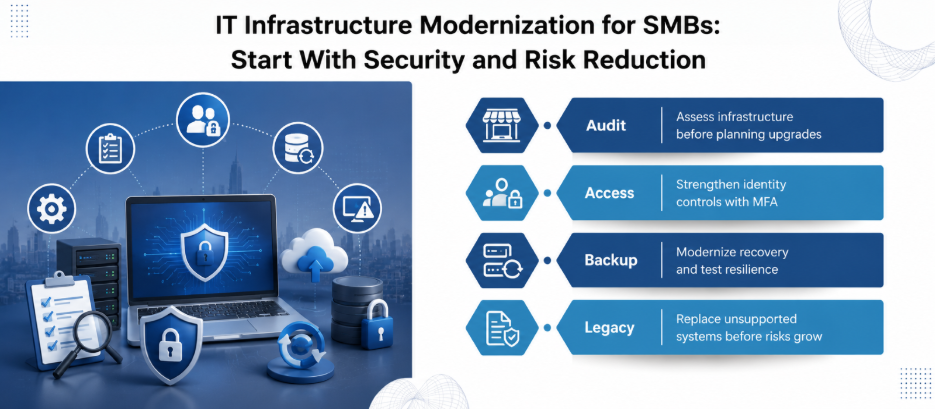
Before replacing anything, create a current-state inventory.
Document your:
- Laptops, desktops, servers and network devices
- Operating systems and software versions
- Internet connections and bandwidth
- Wi-Fi coverage and network architecture
- Firewalls and remote-access methods
- Microsoft 365 or other cloud subscriptions
- Backup systems
- User accounts and administrative privileges
- Hardware warranties and support contracts
- Critical applications and their dependencies
Then classify every component as healthy, aging, unsupported, and business-critical.
This matters because age alone is not a modernization strategy. A five-year-old device running a critical application may deserve attention before a three-year-old laptop used for routine office work.
If you’re running a startup or SMB, look into our wider IT infrastructure and managed services for startups and SMBs to see how you can bundle networking, cloud, cybersecurity, and support together seamlessly.
1. Upgrade Identity and Access Controls First
If your business still relies heavily on passwords alone, identity should move near the top of the modernization list.
Multi-factor authentication (MFA) should be enabled wherever supported, especially for administrator accounts, email, remote access, and systems containing sensitive information.
Next, review:
- Former employee accounts
- Shared administrator accounts
- Excessive permissions
- Dormant accounts
- External users
- Remote-access privileges
Modernization is not simply about adding another security product. It is about reducing the number of unnecessary paths into the business.
2. Fix the Network Before Buying More Devices
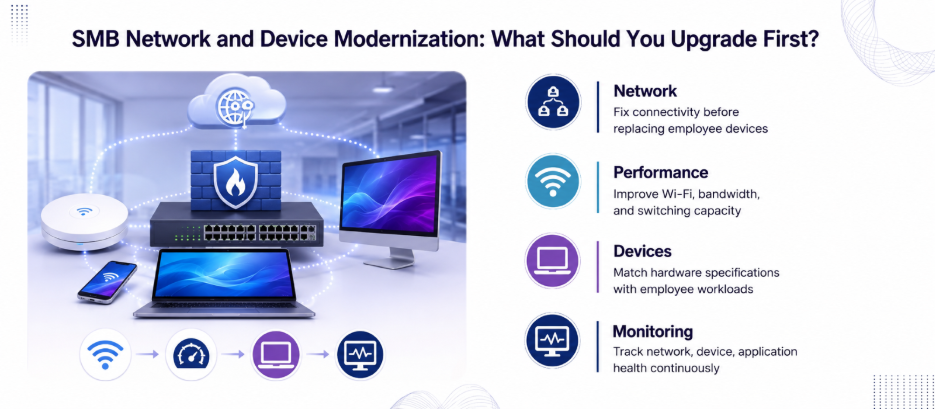
A common SMB mistake is replacing employee devices while leaving the underlying network untouched.
If video meetings freeze, cloud applications respond slowly, or employees complain about inconsistent connectivity, investigate the network first.
Review:
- Internet bandwidth and actual utilization
- Wi-Fi access-point placement
- Network coverage and dead zones
- Switch capacity
- Firewall age and configuration
- VLAN and segmentation requirements
- Remote-access architecture
- Guest-network isolation
For a growing company, the goal should be a network that can accommodate additional users, devices, and applications without becoming a recurring bottleneck.
3. Modernize Backup and Recovery Before Disaster Forces the Decision
Backups are often treated as a checkbox. They should instead be treated as a recovery capability.
Therefore, ask three practical questions:
What is backed up?
Identify business-critical files, databases, configurations, and applications.
Where is the backup stored?
A backup connected permanently to the same environment can be exposed to the same incident.
Can we actually restore it?
A successful backup job does not prove that recovery will work.
CISA recommends offline, encrypted backups and regular testing of backup availability and integrity, particularly in the context of ransomware resilience.
For SMBs, this can produce more business value than replacing perfectly functional hardware.
4. Replace Unsupported Infrastructure
Unsupported operating systems, network devices, and applications create a different problem. The business may be operating technology that no longer receives appropriate security updates or vendor support.
Therefore, create an end-of-support register. For every critical system, record:
- Current version
- Vendor support status
- Replacement options
- Application dependencies
- Migration complexity
- Business impact
- Planned retirement date
This is where an IT infrastructure solution provider can add practical value. Instead of recommending wholesale replacement, the provider can help identify which legacy components genuinely require immediate action and which can remain temporarily with appropriate controls.
5. Modernize Employee Devices Based on Workloads
Not every employee needs the same laptop.
A finance user working with large spreadsheets may have different requirements from a sales representative who spends most of the day in browser-based CRM applications.
Therefore, build device standards around:
- Application requirements
- CPU and memory demands
- Storage needs
- Mobility
- Battery requirements
- Security features
- Warranty and support
- Expected replacement cycle
This approach prevents buying premium hardware for everyone when only a subset of employees actually needs it.
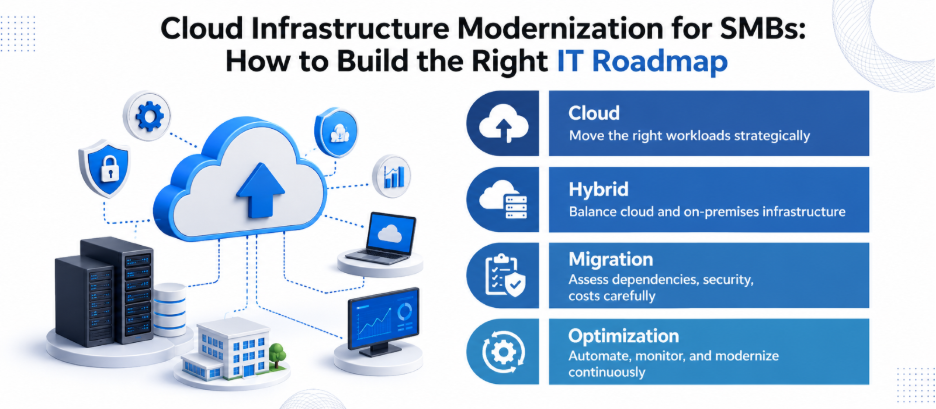
6. Move the Right Workloads to the Cloud
Cloud migration should not become a blanket instruction. Some workloads may benefit from cloud platforms because they reduce the operational burden of maintaining physical infrastructure.
Therefore, CISA urges SMBs to skip the self-hosted hassle and use managed cloud tools for services like email and file storage.
But migration should start with workload assessment. For each application, ask:
- Does it need to remain on-premises?
- Is there a mature SaaS alternative?
- What data does it contain?
- What integrations does it depend on?
- What happens if connectivity fails?
- What are the licensing implications?
- How difficult would migration be?
The answer may be cloud, hybrid, or on-premises. Modernization is about choosing the right architecture, not following a trend.
7. Introduce Monitoring Before Problems Become Complaints
Once the core infrastructure is upgraded, visibility becomes increasingly important.
Track indicators like:
- Network availability
- Internet utilization
- Device health
- Backup status
- Storage capacity
- Security alerts
- Patch status
- Critical application availability
This changes IT support from a reactive model to a more measurable operating function.
An IT infrastructure solution provider should be able to translate these metrics into business decisions.
The Modernization Priority Matrix
For most SMBs, a sensible sequence looks like this:
Phase 1 — Risk reduction: Identity, MFA, backups, patching and unsupported systems.
Phase 2 — Connectivity: Internet, Wi-Fi, switching, firewall and segmentation.
Phase 3 — Productivity: Employee devices, collaboration tools and application performance.
Phase 4 — Architecture: Cloud migration, virtualization, server consolidation and workload modernization.
Phase 5 — Optimization: Monitoring, automation, lifecycle management and strategic planning.
This sequence is not universal. A manufacturing company with failing servers may need to reverse parts of it. That is why modernization should begin with business impact rather than a standard technology package.
What Should SMBs Upgrade First?
The best first upgrade is usually the one that removes the greatest combination of risk, downtime, and operational friction.
- If identity is weak, fix identity.
- If the network is the bottleneck, fix connectivity.
- If recovery is uncertain, fix backups.
- If unsupported systems create unacceptable exposure, replace them.
- If employees are losing hours to unreliable hardware, refresh devices based on actual workloads.
The role of an IT infrastructure solution provider should be to help prioritize these decisions using evidence from your environment.
Not sure which upgrade will deliver the biggest impact? Let Nurture IT in Indiranagar assess your environment!
FAQs
1. What is IT infrastructure modernization for an SMB?
It is the planned improvement or replacement of the technology systems that support business operations, including networks, devices, servers, cloud platforms, security controls, backups, and applications.
2. What should an SMB modernize first?
Start with areas that create the greatest business risk or operational disruption. Identity security, backups, unsupported systems and network reliability are often strong starting points.
3. Does every SMB need to move to the cloud?
No. Cloud, hybrid and on-premises architectures can all be appropriate. The choice depends on application requirements, security, cost, connectivity, compliance and operational needs.
4. How often should SMBs replace laptops?
There is no universal replacement interval. Businesses should consider device performance, warranty status, security support, repair costs and employee workload rather than replacing devices purely because they have reached a particular age.
5. Why is network modernization important?
A reliable network supports cloud applications, collaboration, remote work and business systems. Weak Wi-Fi, outdated firewalls, or insufficient capacity can affect productivity even when employee devices are relatively new.